
Step-by-Step: How to Test Your FS25 Mods with TestRunner
The TestRunner, developed by GIANTS Software, is a tool designed to ensure your mod is ready for upload by checking for potential issues like duplicate files, texture formats, XML validation, and more. To download it, visit the Downloads page on the GDN and locate the link for the Farming Simulator 25 TestRunner.
Once downloaded, unzip the folder and place the TestRunner_public.exe file in the directory containing all your mods. To test a specific mod, simply drag the mod’s directory onto the executable (as shown in the image below), and the TestRunner will run diagnostics on the selected folder.
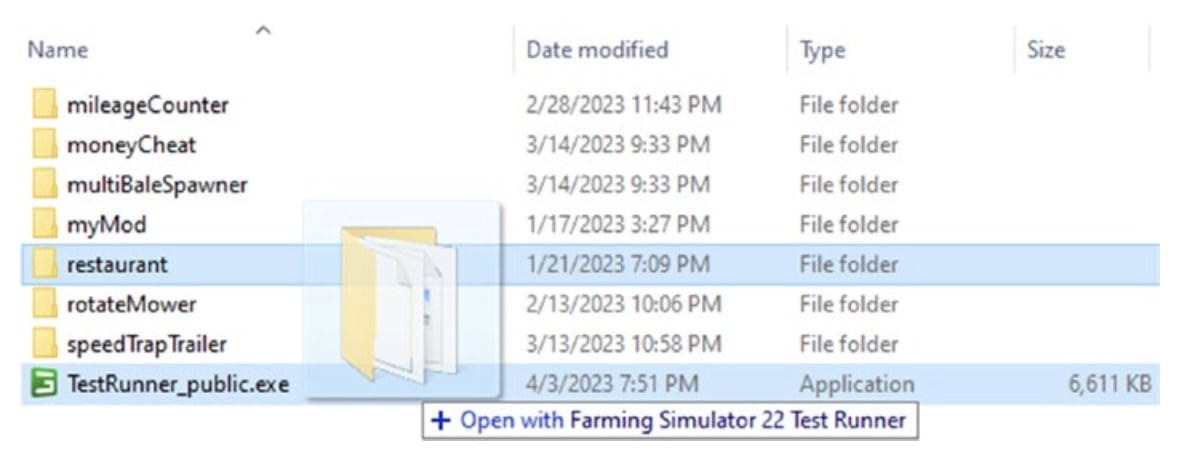
Your mod folder doesn’t have to be located in the same directory as the TestRunner, though it can be helpful for ease of use. When you run the TestRunner, a command-line window will open, showing the progress of the test. If there’s an issue, an error message will appear, providing details about the problem. All TestRunner outputs are stored in TestRunner.log, and both XML and HTML files are generated in the same directory as the TestRunner. These files, named after the tested mod’s directory, contain the test results.
The HTML file lists all identified errors per module, while the XML file includes errors along with additional metadata. The HTML report should open automatically in your web browser, where errors are highlighted in red, explanations are in italics, and suggestions for corrections are shown in green.
Mike Ursu has posted a helpful video on using TestRunner to test your mod, which you can watch below.


Testing Your FS25 Mods: A Guide to Using the TestRunner – Windows & macOS Desktop Technical Guides
Need Windows 10/11 (x64) or macOS (Apple Silicon M1–M4 / Intel) compatibility specs, installation steps, or troubleshooting fixes for Testing Your FS25 Mods: A Guide to Using the TestRunner? Explore our dedicated desktop sub-guides:
- Testing Your FS25 Mods: A Guide to Using the TestRunner Windows & macOS System Requirements
- How to Install Testing Your FS25 Mods: A Guide to Using the TestRunner (Windows & Mac Setup)
- Testing Your FS25 Mods: A Guide to Using the TestRunner Startup Crash, DLL & Permission Fixes
- Testing Your FS25 Mods: A Guide to Using the TestRunner Latest Build Changelog & Patch Notes